Get in touch with AQUA Company

GEOCELLULAR MODULE TOOLS · AQUA RAINWATER
Geocellular Module Planning Tools
Have a required storage volume, a site footprint or a module count? Choose the tool for that input. Get a result now, develop the layout and carry the saved quantities into a supply brief.
- 10 independent planning tools
- ARW-1050 and ARW-1040
- Results available immediately
- Project data travels with you
The required storage volume comes from your project design. These tools turn that target into product and layout references.
PROJECT INSTALLATION // FIELD PHOTOGEOCELLULAR TANK
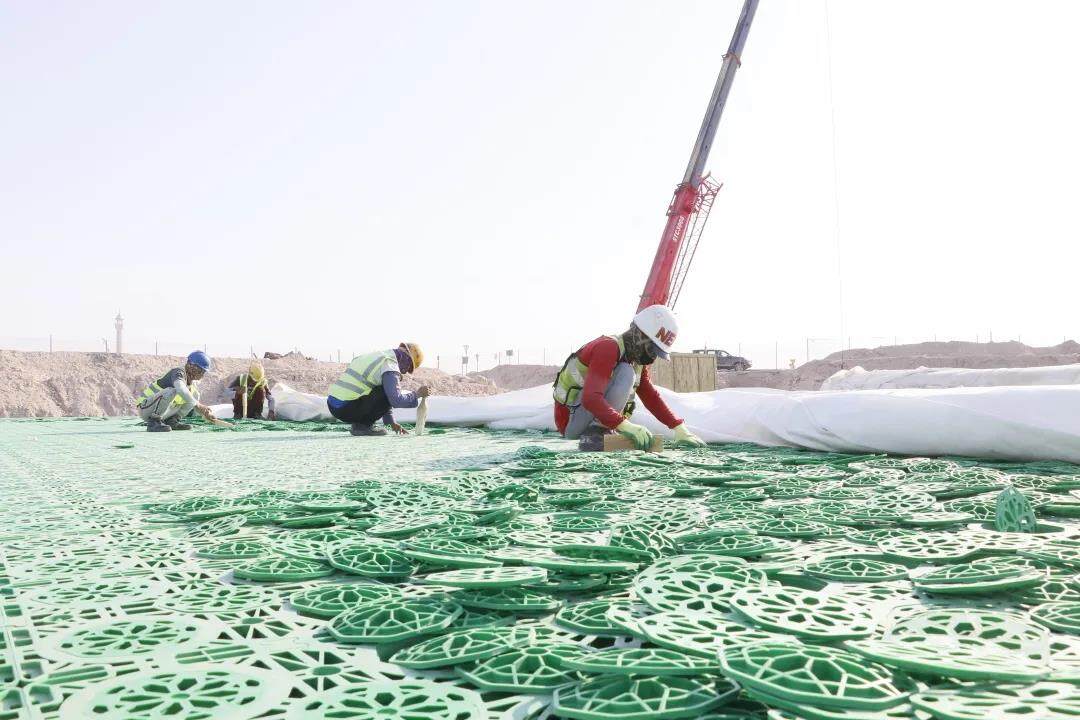
On-site module installationActual site photograph; project layouts vary
01 / START WITH A DEFINED INPUT
What do you already know?
Storage target supplied: estimate modules and compare the 400 / 500 mm footprint. Space supplied: test the depth or draw a layout first.
No required storage volume yet? Confirm the rainfall, runoff, release or infiltration design basis before using a product quantity as the design volume.
SELECT THE NEXT CALCULATION
Choose by what you know now.
There is no required sequence. Each stage opens the tools that answer a specific project question.
10INDEPENDENT
TOOLS
TOOLS
Estimate from a known storage target
You have a required storage volume from project design, or need an early product comparison.
Module Quantity Estimator
START WITHA known storage target or complete-unit countGETTheoretical units, complete-layer plan, purchasing allowance and an optional layout startOpen toolUAE Module Quantity
START WITHStorage target, planned layers and available areaGETWhole units, nominal footprint and an area-budget warningOpen toolCompare Product Families
START WITHA gross storage target before choosing a familyGETEarly quantity and supplied-volume references; only 1050/1040 continue into module planningOpen toolCheck the available space
You know the site dimensions, available depth or a proposed row-and-column layout.
400 / 500 mm Depth Comparison
START WITHStorage target and module-zone or total construction depthGETFitting layer candidates and plan area for each heightOpen toolRectangular Layout Capacity
START WITHRows, columns, layers and optional site dimensionsGETNominal storage, footprint and normal/rotated site fitOpen toolModule Layout & BOM
START WITHA rectangular footprint or several rectangles to add or subtractGETActual 1050/1040 layout, shared clips, caps, side panels, wrapping and excavation referenceOpen toolSet product and material requirements
You need to compare grades or define how the water will leave or remain in the tank.
Module Grade Comparison
START WITHProduct-level load thresholds for 1050 or 1040GETStandard grade comparison and a custom-specification requestOpen toolMaterial Interface Route
START WITHAttenuation, infiltration or lined reuse intentGETA route-specific membrane, geotextile and interface checklist; layout quantities when savedOpen toolPrepare the supply request
You have an installed quantity, order quantity or a project brief to send.
Container Loading Estimator
START WITHWhole order units or a defined module-volume basisGETApproximate 40 ft loading, remaining reference space and extra-cargo notesOpen toolUnderground Storage RFQ Preparation
START WITHYour saved calculations or a manual supply quantityGETA project brief with BOM, missing inputs and a downloadable enquiry packOpen toolWHAT HAPPENS AFTER THE CALCULATION
Use the result at the next project step.
01
Compare a candidate
See module quantity, nominal capacity, depth and site fit immediately. Test another height or layout before committing to a model.
02
Coordinate a layout
Draw rectangles, review the installed BOM and wrapping reference, then save or print the same project for your team.
03
Prepare supply review
Use the ordered quantity for loading. Add pipe, site and delivery inputs only when you want a supplier-ready brief.
The design storage target, installed module count and ordered units are separate numbers. Results remain visible without an enquiry; project hydraulic and structural checks remain with the design team.
DIRECT ACCESS
All module tools
Prefer to pick one tool yourself? Every calculator keeps its own page and result.
Browse all 10 tools
01 / 04
Estimate from a known storage target
02 / 04
Check the available space
BEFORE YOU USE THE FIGURES
Three practical questions
Start with the information you have. The output is a product planning reference that you can take into project review.
Do I need a drawing to start?
No. A required storage volume can start the quantity estimator. A known rectangular space can start the capacity tool. Draw a detailed module layout when you need installed quantities and materials.
Will these tools calculate the required stormwater storage?
No. Runoff, permitted discharge and soil conditions determine that project design target. Enter the required volume from the hydraulic design, then use these tools to compare module options and layout quantities.
Do I have to enquire before I see or keep the result?
No. Results appear immediately. You can print or download a calculation, save the project locally, and prepare a supply enquiry only when you want review of the configuration.
READY FOR SUPPLY REVIEW?
Carry the configuration into a clear enquiry.
Save your calculations, note the unresolved pipe and site conditions, and download a project brief for review.